

Waka TV : Live Sports, Movies & TV in One App
Watch on compatible Android devices with a plan that fits you.Pay online and receive your 16-digit recharge code by email after payment confirmation.

Choose Your Waka TV Subscription Plan
Choose a plan, pay online in ZAR and receive your recharge code by email.
Waka TV Monthly
Live TV + Movies & Series
R 140.00
≈ $ 8Use on 1 TV&
 1 Mobileat a timeValid for30daysCompatible withAndroiddevices"
*Requires Android 5.0 or later. Compatible with supported Android mobile devices, Android TV, TV boxes and TV sticks.
Waka TV 2-Month
Live TV + Movies & Series
R 260.00
≈ $ 14Use on1 TV&1 Mobileat a timeValid for60daysCompatible withAndroiddevices"*Requires Android 5.0 or later. Compatible with supported Android mobile devices, Android TV, TV boxes and TV sticks.
Waka TV Quarterly
Live TV + Movies & Series
R 370.00
≈ $ 21Use on1 TV&1 Mobileat a timeValid for90daysCompatible withAndroiddevices"*Requires Android 5.0 or later. Compatible with supported Android mobile devices, Android TV, TV boxes and TV sticks.
Waka TV 6-Month
Live TV + Movies & Series
R 690.00
≈ $ 43Use on1 TV&1 Mobileat a timeValid for180daysCompatible withAndroiddevices"*Requires Android 5.0 or later. Compatible with supported Android mobile devices, Android TV, TV boxes and TV sticks.
Waka TV Yearly
Live TV + Movies & Series
R 1,400.00
≈ $ 80Use on1 TV&1 Mobileat a timeValid for365daysCompatible withAndroiddevices"*Requires Android 5.0 or later. Compatible with supported Android mobile devices, Android TV, TV boxes and TV sticks.
Bundle Monthly
Waka TV+Watchlist Pro Monthly
Live TV + Movies & Series
R 180.00
≈ $ 11Use on1 TV&1 Mobileat a timeValid for30daysCompatible withAndroiddevices"*Requires Android 5.0 or later. Compatible with supported Android mobile devices, Android TV, TV boxes and TV sticks.
Bundle Quarterly
Waka TV+Watchlist Pro Quarterly
Live TV + Movies & Series
R 500.00
≈ $ 31Use on1 TV&1 Mobileat a timeValid for90daysCompatible withAndroiddevices"*Requires Android 5.0 or later. Compatible with supported Android mobile devices, Android TV, TV boxes and TV sticks.
Bundle Yearly
Waka TV+Watchlist Pro Yearly
Live TV + Movies & Series
R 1,800.00
≈ $ 112Use on1 TV&1 Mobileat a timeValid for365daysCompatible withAndroiddevices"*Requires Android 5.0 or later. Compatible with supported Android mobile devices, Android TV, TV boxes and TV sticks.
Why Choose Waka TV?
Subscribe or renew online, receive your recharge code by email and get support when you need it.

Fast Code Delivery
Receive your 16-digit Waka TV recharge code by email after payment confirmation.

Live TV, Movies & Series
Enjoy live entertainment and sports on supported Android devices.

Multiple Device Options
Compatible with supported Android mobile devices, Android TV, TV boxes and TV sticks.

Flexible Subscription Plans
Choose from monthly, quarterly, 6-month and yearly subscription options.

WhatsApp Support
Contact us on WhatsApp for help with payment, activation and installation.
There’s nothing better than gathering with friends in my living room after a long, hectic week – thanks to Waka TV, we watch our favorite athletes battle it out, celebrate every goal together, and forget all about the pressures of daily life.

Waka TV runs smoothly on multiple devices and syncs my watch history seamlessly. Whether I’m commuting home or traveling for business, I never miss a single exciting game or any of those unforgettable highlight moments.

Download the Waka TV App
Choose the Waka TV app version for your Android mobile, Android TV, TV stick or TV box.




How to install Waka TV on a TV Device
STEP 1
Install “Downloader by AFTVnews” from Google Play.

STEP 2
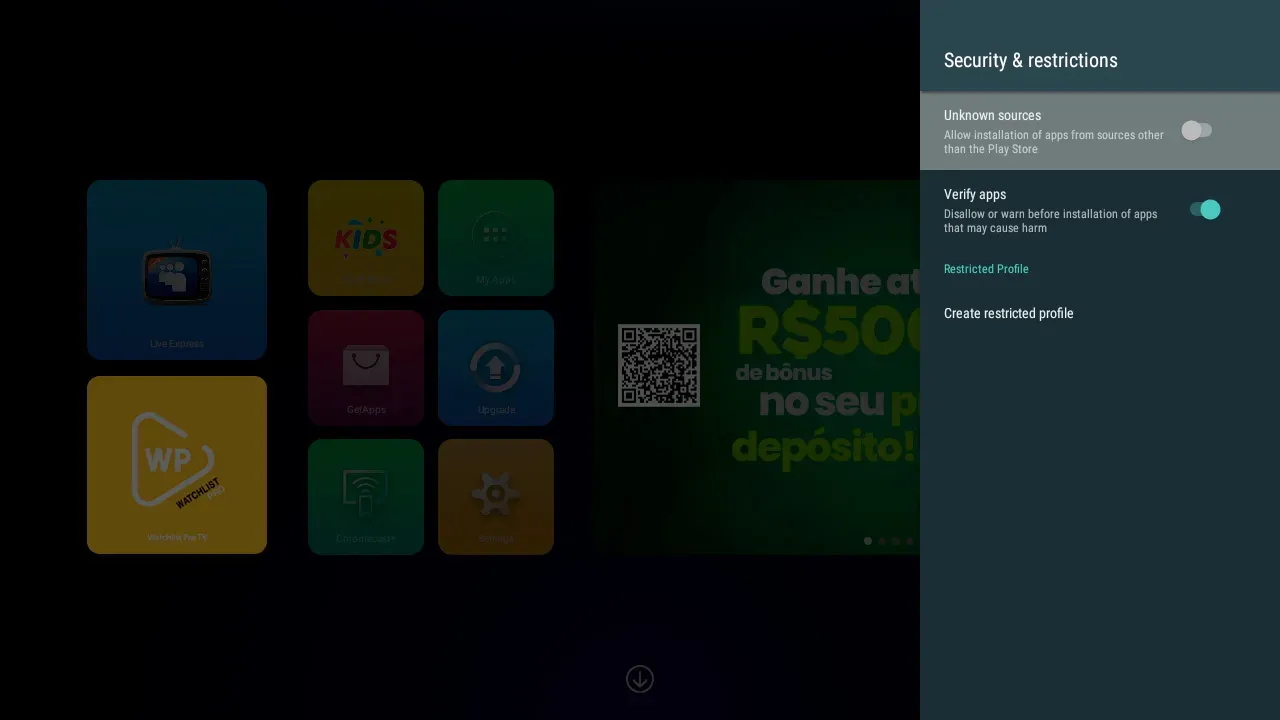
Open settings > go to security & Restrictions > and allow Downloader to install Apps from unknown sources.
STEP 3
Open “Downloader by AFTVnews” ,enter code 491126 and follow the on-screen instructions to install Waka TV.

If your TV supports USB flash drives, you can download the APK and install it using a flash drive.For installation assistance, contact us on WhatsApp.
Waka TV Payment, Subscription & Installation FAQs
Getting Started
What is Waka TV?
Waka TV is a Live TV & VOD app, available for Android devices, with more than 80,000 movies & series and 220+ live channels, including the best in sport, news, and entertainment with movies and series.The app is compatible with:- Android smartphones.
- Android TV BOX.
- Android TV.
- TV Stick.
How do I download and install Waka TV or APK?
To get started with Waka TV, follow the installation process outlined below, which works for Android mobile, TV box and Smart TV Android/TV Stick:Mobile:-
Access the Download Link: Please access the following link directly on your mobile’s internet browser: mobile.wakatv.net
-
Download Will Begin: Once you access the link, the download of our app will start immediately. Please be patient while the download completes; this may take a few moments depending on your internet speed.
-
Install the App: After the download is complete, you can find the APK file in your device’s “Downloads” folder and click “Install” Note: If you see a Google Security pop-up saying “The app is harmful”, follow these steps to install the app:
1. Tap “More details.”
2. Tap “Install anyway.”
3. Do not tap “Got it” to ensure the app installs successfully.
-
How do I update the app?
When a new version is available, you may receive an update notification in the app. You can also check for updates under Menu → Info → Check Update.
Is Waka TV available in South Africa only?
Waka TV is primarily used by customers in South Africa and is also available to customers in other supported African markets. Content availability may vary by region.
Payment & Subscription
How do I buy a plan?
We are an authorized dealer of Waka TV.
You can subscribe to a Waka TV plan from our website.
FROM OUR WEBSITE
1. Choose your preferred plan.
2. Select your currency.
3. Complete the payment process.
Your billing information will be shown on the screen after payment, and you’ll receive a confirmation email.Which currency options are available for payment?
You have several options to pay for Waka TV, with different accepted currencies:-
ZAR (South African Rand)
-
KES (Kenyan Shilling)
-
USD (Dollar)
-
How to receive your recharge code
When you place an order, just make sure to leave your WhatsApp number, email, and name on our site.
You can get your recharge code in three easy ways:
-
Check your email – Right after your payment goes through, we’ll send the code straight to the email you used at checkout.
-
See it on our site – Once payment is done, you’ll be redirected to a page showing your order info with the code on it. You can also find it anytime in the “My Account” section under your orders.
-
Reach out on WhatsApp – Drop us a message on WhatsApp with your email and order number, and our team will send the code right back to you via WhatsApp.
Got questions? Just give us a shout—we’re happy to help!
-
How to Know a Plan is Active
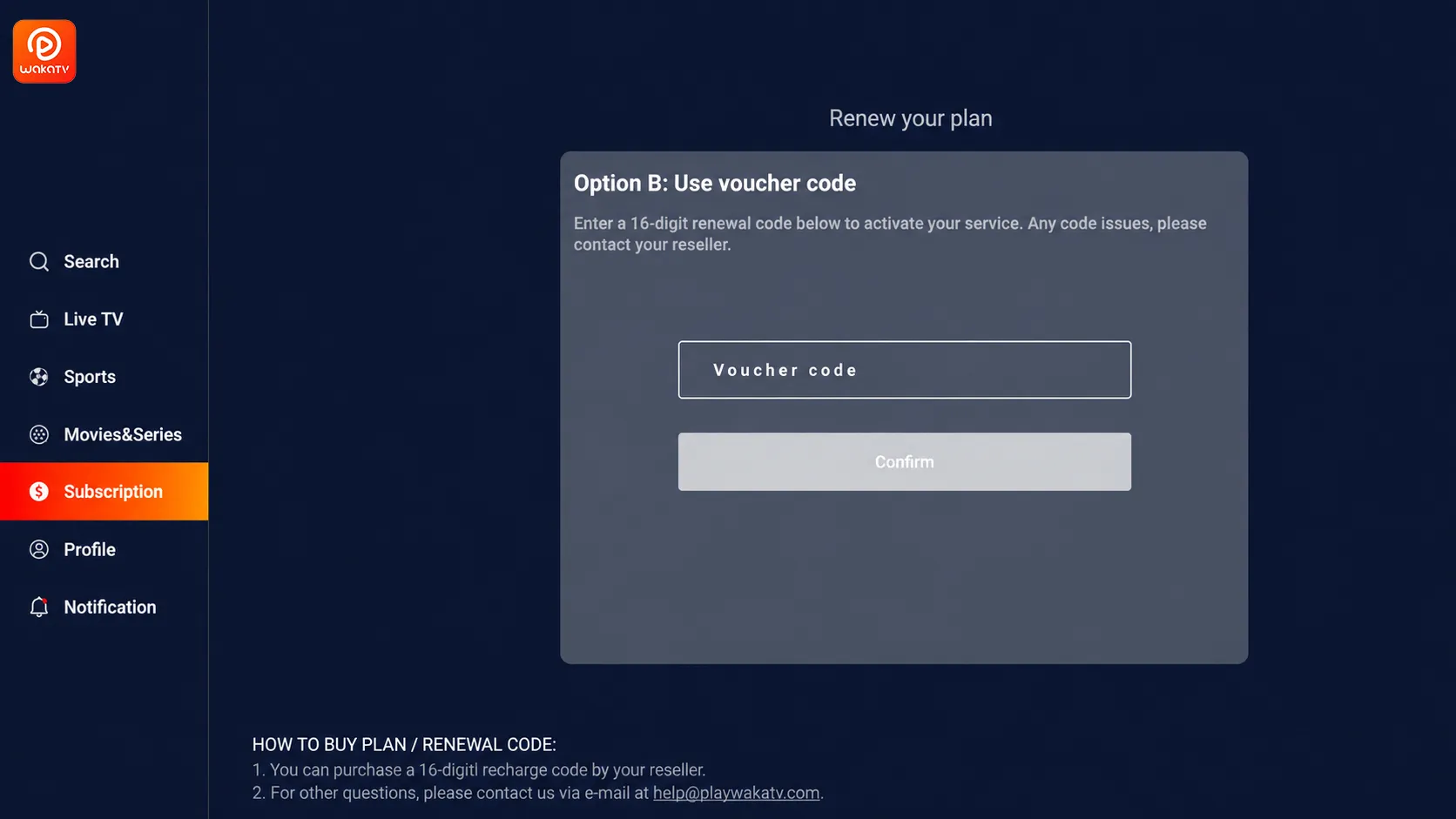
Once you have received your recharge code (a 16-digit number),
please open the application and navigate to My Account > Subscription. Enter the recharge code there to activate your subscription.
How can I contact Waka TV Global support?
We are an authorized dealer offering 24/7 WhatsApp customer support.
When you purchase from us, we take the time to carefully answer all your questions, ensuring you enjoy a great buying and viewing experience.
Email: wakatv@wakatvglobal.com
Troubleshooting
If the app is not working, what should I do?
Instabilities can occur for a variety of reasons and it is often possible to resolve them very simply!If you are experiencing problems, please carry out the procedures specified down below. In case there is no improvement, we kindly ask you to contact us : WhatsApp and share with us further details.1) Check if the network connection is stable and restart your device/modem, disconnecting all cables for a few minutes. If you use Wi-Fi, try connecting a network cable to minimize fluctuations.2) Make sure you are using the latest version of the app. If an update is necessary, you can perform it either on our website, or within the app by accessing “Menu” → “Info” → “Check Update”.3) Clean the cache and restart again after a few minutes: “Settings” → “Applications” → “Waka TV”→ “Clear Cache”.-
IMPORTANT: remember to write down your access details (account or recharge code), as the app may request them again.
-
Fast service, great value – and I get all my favorite sports in one go. The support team was incredibly helpful and walked me through the setup with patience and warmth.